
Grocery List App - rShopping
((RayDar)) ConnectedShopping
4.5430.00 Reviews
- Version
- 2.6.25
- Installs
- 100.00K
- Age Rating
- Everyone
Screenshots
Our Review of Grocery List App - rShopping
 Analysis by Appyee
I find Grocery List App - rShopping most useful when the goal is to get through an ordinary shop with fewer forgotten items and less back-and-forth between a phone and a scrap of paper. It is a shopping app from ((RayDar)) Connected, and its focus is refreshingly practical: putting the list, quantities, and prices in one place. My impression is that it suits people who want an organized routine more than shoppers looking for a full supermarket catalogue or a meal-planning system.
Its age is part of the picture. The app first appeared on June 1, 2010, and its current version is 2.6.25, so this is an established tool rather than a brand-new experiment. That history may appeal if you value a focused list-maker, though age alone does not tell you how actively it will fit your particular shopping habits. I would judge it by whether its list workflow matches the way you shop, not by expecting it to replace every shopping service on your phone.
What its current approach is good at
The central appeal is reducing the small bits of friction that make grocery trips feel messy: remembering what to buy, keeping quantities straight, and coordinating with another person. Sharing and editing a list can make a household routine easier when one person notices an item is running low while someone else is already out. Rather than relying on scattered messages, you can keep the shopping decisions together in one list.
That does not mean every household will get the same benefit. Shared lists work best when everyone agrees on how to name things and update quantities. “Milk” may be enough for one person, while another needs a particular kind; a quick note or a more precise item name can prevent a second trip. I’d use the list as a shared checklist, but still make the details explicit when substitutions matter.
For a weekly shop, I’d build the list as soon as I notice something is running low, then add meal ingredients before leaving. The practical payoff is not just having everything written down; it is being able to review the whole shop before setting off. That is where prices and quantities can help: entering them takes a little effort, but it gives the list a budgeting purpose as well as a memory purpose.
How the workflow holds up in everyday shopping
I find that a shared grocery list earns its place when it makes handoffs clearer, not merely when it collects more items. I’d use a quick top-up to see whether names, quantities, and updates stay understandable between shoppers, then consider how that same routine holds up when the shop is larger and needs more planning.
From a quick top-up to a planned shop
When it comes to organizing your grocery list in a way that feels less like a chore and more like a breeze, rShopping is a nifty app that truly stands out. I decided to give it a whirl to see what all the fuss is about, and I’m here to spill the beans.
Getting Started with rShopping
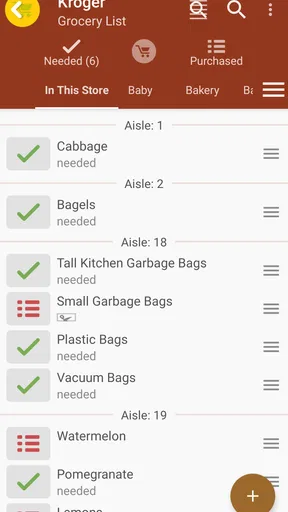
First things first, downloading rShopping is as straightforward as it gets. Available on both Android and iOS, it felt like just a few taps and I was ready to dive in. The app has a clean and intuitive interface, which I appreciated right off the bat. No unnecessary clutter, just a simple, user-friendly design that makes navigating a piece of cake.
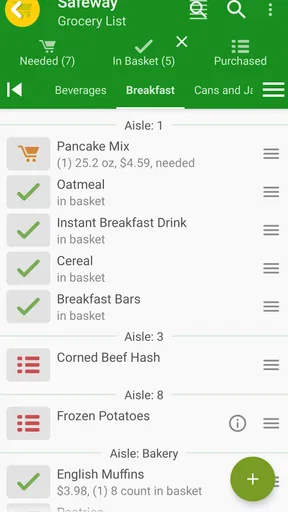
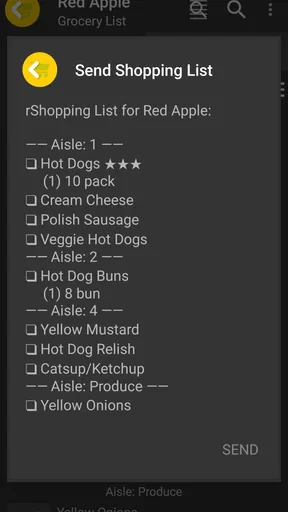
Setting up your first shopping list is a breeze. As soon as you open the app, you’re greeted with options to create a new list or browse existing ones. I found myself creating a new list almost immediately. Adding items is as simple as typing them in, and you can even categorize them by sections like Produce, Dairy, and Snacks. This categorization is a game-changer for anyone aiming to streamline their grocery shopping experience.
Features That Make a Difference
One of the most impressive features is the ability to share your list with others. Whether you’re coordinating with roommates or sharing with family, the collaborative aspect is seamless. You can invite others to view or edit the list in real-time, which is super handy for those “Oops, I forgot to add milk!” moments.
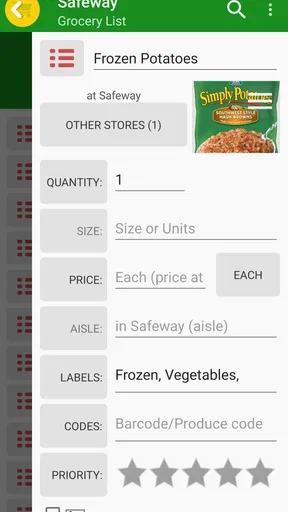
The app also supports barcode scanning, which I found to be a neat feature. Simply scan the barcode of a product, and it automatically adds the item to your list. This not only saves time but also reduces errors in listing items. Plus, it supports voice input, which is perfect for when your hands are full or you’re on the go.
Staying Organized
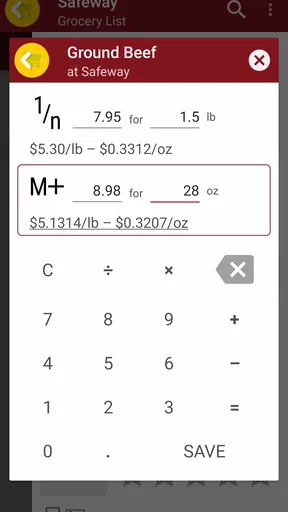
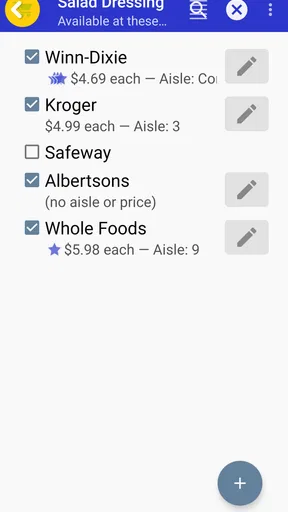
What I particularly liked about rShopping is its ability to keep track of prices and quantities. If you’re on a budget, this feature is worth its weight in gold. You can input prices for each item, and the app will tally up your total, ensuring you’re always aware of how much you’re spending. This is especially helpful if you’re planning meals or sticking to a strict budget.
The app also offers reminders, ensuring you never forget to pick up essential items. You can set these reminders based on location, which means if you’re near a store, the app will nudge you to check your list. It's like having a personal assistant in your pocket, making sure you’re always on top of things.
Choosing the right tool for your routine
If you mainly need a shared checklist, I would compare this with a standard notes app before choosing. Notes can be perfectly adequate for a short list, especially if everyone already uses the same service. The difference here is the grocery-oriented structure: categories, quantities, prices, and shopping reminders can make a repeat shop easier to scan than a long block of text. The trade-off is that a simpler notes app may take less setup if you rarely shop with anyone else.
For shoppers who usually order groceries through a retailer’s own app, that retailer’s tool may be better for checking its catalogue or placing an order. A general list app is a different kind of companion: it can help you plan what to buy without making the shopping list itself dependent on one store’s ordering flow. I would not treat it as a substitute for a store app when product availability, delivery, or checkout is the main concern.
A useful way to test the fit is to make one list for a regular top-up and another for a larger planned shop. Keep frequently repeated items named consistently, and use quantities where “one” or “some” could be misread. If you share the list, agree whether the person shopping should mark items as they go or simply remove them; a household rule like that prevents confusion about what has already been picked up.
Small habits that make the features more useful
Barcode scanning is most valuable when you are adding a packaged product you already have at home, because scanning can spare you from typing its name. It is less useful for loose produce or items without a handy barcode, so I would not plan on scanning every entry. A mixed workflow—scan packaged staples, type fresh ingredients, and use voice input when your hands are occupied—plays to the strengths of each method rather than forcing one input style.
Voice input is convenient for capturing a thought quickly, but I would review the list afterward, especially if the item name or quantity needs to be exact. That extra check is a sensible trade-off: fast capture helps prevent forgetting, while a brief edit avoids arriving at the shop with an ambiguous entry. The same principle applies to shared edits; a quick look before leaving is worthwhile if several people have added items.
Price tracking is most helpful when you enter prices consistently. If you only add prices to some items, the displayed total can still be a useful partial estimate, but it should not be mistaken for a complete budget. I would update amounts when prices change and use quantities carefully, particularly for items sold by weight or in different package sizes. That makes the total more meaningful without turning list-making into a bookkeeping chore.
Who is likely to appreciate it—and who may not
I can see this app working especially well for couples, families, and roommates who routinely divide shopping tasks. A person at home can add a forgotten ingredient while the shopper is on the way, and categories can help the shopper move through a store without repeatedly rereading an unstructured list. It also makes sense for someone who likes to estimate a basket total before leaving, provided they are willing to enter prices and quantities.
It is less compelling if your shopping is occasional and usually involves just a few items. A paper note or a basic phone note may be quicker for that kind of errand. Likewise, if you want recipes to generate shopping lists, store-specific deals, online ordering, or a complete pantry inventory, I would look for a tool built around those jobs rather than assuming a grocery checklist covers them. The right choice depends on whether your main problem is forgetting and coordinating, or managing the whole food-shopping process.
One realistic use case is a midweek dinner change. I might realize that a meal needs an extra ingredient while a family member is already near the shop. I can add the item to the shared list, make the name specific enough to avoid a wrong substitute, and let the shopper check it alongside the other items. If the trip is just a quick stop, that direct handoff is more useful than starting a conversation in a separate messaging thread and hoping the detail is not buried.
Practical limits and expectations
The features that make a list more capable also ask for a little upkeep. Prices do not stay accurate by themselves if you do not maintain them, and shared lists are only as clear as the entries people add. Location-based reminders can be helpful, but they are best treated as a prompt to check the list rather than a guarantee that you will remember every errand. I would still glance at the list before leaving, especially for a time-sensitive shop.
There is also a difference between organizing a shop and making the shop cheaper or faster in every circumstance. Categories can help with a familiar store layout, but they cannot ensure that a particular product is available or that a price is current. For a one-off trip to an unfamiliar store, I would prioritize clear item names and quantities over carefully arranging every item into a perfect sequence. The list should save effort, not create extra admin.
For an existing user, the current version number is a useful point of reference when checking compatibility or comparing notes with someone else, but it does not by itself tell me what changed from earlier releases. What matters in day-to-day use is whether the version available on your device supports the parts of the workflow you rely on, particularly sharing, scanning, and reminders. I would keep the app updated through the relevant app store and check its behavior after an update before depending on it for a complicated shared shop.
Cost, access, and the longer view
The app is free to download, with in-app purchases listed at $0.99 to $1.49 per item. That makes it easy to try the basic shopping routine before deciding whether any optional purchase is worthwhile. I would first use it for a normal shop and see whether list sharing, item entry, and price tracking actually fit my habits; there is little reason to pay for anything unless it solves a need I have encountered in practice.
It is rated for Everyone, and its average rating is 4.6 from around 1.6 thousand ratings, with over 100 thousand installs. Those figures suggest that it has found an audience, but they cannot tell me whether its particular approach suits a household that shops in a very different way. I would treat them as context, not as a promise that every feature will feel effortless on every device.
The most useful thing to watch over time is whether the app continues to work smoothly for the way you depend on it. If you rely on sharing, test a change with another list member before a large shop; if you rely on price totals, confirm that the entries still reflect your usual basket. Those small checks make sense for any tool that has become part of a routine, and they help you notice early if your needs have shifted toward a retailer app or a broader meal-planning service.
Final Thoughts
All in all, rShopping is a robust app that takes the hassle out of grocery shopping. Its user-friendly interface, combined with practical features like list sharing, barcode scanning, and budget tracking, makes it a must-have for anyone looking to streamline their shopping experience. The ability to categorize items and keep track of prices is a huge plus, especially for those of us who are a bit forgetful or budget-conscious.
If you’re tired of juggling multiple paper lists or dealing with disorganized notes, give rShopping a try. It’s like having your own shopping assistant, minus the cost. I found it incredibly helpful, and I’m sure you will too. Happy shopping!
Verdict
Strengths of Grocery List App - rShopping
- User-friendly interface, easy navigation.
- Syncs across multiple devices seamlessly.
- Customizable lists for different stores.
- Barcode scanning to add items quickly.
- Offline mode available for convenience.
Limitations of Grocery List App - rShopping
- Occasional sync delays reported.
- Limited integration with other apps.
- Premium features behind a paywall.
- Ads can be intrusive at times.
- No voice input for list creation.
Similar Picks in This Category
View All
SHEIN-Shopping Online
Roadget Business PTE. LTD.4.8

Amazon Shopping
Amazon Mobile LLC4.4


Mercado Libre: Compras online
Mercado Libre4.8

Wish: Shop and Save
Wish US Holdings LLC4.7

Alibaba.com - B2B marketplace
Alibaba Mobile4.4
Frequently Asked Questions
What features does the Grocery List App - rShopping offer?
The Grocery List App - rShopping provides a range of features designed to simplify your shopping experience. It includes customizable lists, barcode scanning, price comparison, and syncing across devices. Users can categorize items, set reminders, and even share lists with family or friends, making it a comprehensive tool for managing grocery needs.
Is the Grocery List App - rShopping user-friendly for beginners?
Yes, the app is designed with an intuitive interface that caters to both tech-savvy users and beginners. The setup process is straightforward, with clear instructions and helpful tips. Users can easily navigate through features such as list creation, item categorization, and syncing, ensuring a smooth experience from the start.
Can I use the Grocery List App - rShopping offline?
Absolutely! The app is equipped to function offline, allowing users to access their grocery lists without an internet connection. This feature is particularly useful in places with poor connectivity, like certain stores, ensuring that your shopping is uninterrupted and efficient.
How does data syncing work in the Grocery List App - rShopping?
Data syncing in rShopping is seamless and automatic. Once connected to the internet, the app updates your lists across all registered devices. This ensures that any changes made on one device are instantly reflected on others, offering a cohesive and synchronized shopping experience for all users.
Is my personal information secure with the Grocery List App - rShopping?
Security is a top priority for rShopping. The app employs advanced encryption protocols to safeguard user data. Personal information and shopping habits are protected, with options for users to manage privacy settings. Regular updates ensure that the app remains compliant with the latest security standards.
